Metafields Guru April 2025 update: Shopify Files-backed HTML editor and new customer/page filters

In April 2025, Metafields Guru shipped a major refresh of its HTML editor and added new filtering options across the app. Images pasted into the WYSIWYG HTML editor now upload straight to Shopify Files instead of living inside the metafield value, editors gained a pin-to-screen mode, and customers and pages picked up the same metafield-based filters that products and collections already had.
What's new at a glance
- Shopify Files-backed image uploads - images pasted into the HTML editor now upload to Shopify Files instead of living inside the metafield value.
- Reuse existing Shopify Files - a new image picker lets you insert files you already uploaded, no re-uploading.
- Responsive images and layout control - inserted images ship with
srcsetautomatically and get simple size/alignment controls. - Custom HTML attributes survive editing - custom classes and attributes on your markup are no longer stripped out.
- Editor pinning - HTML, JSON, and Rich Text editors can now be pinned open at full height while you work.
- New filters for customers and pages - metafield-based filtering, previously available for products and collections, now covers customers and pages too.
Major improvements to visual editors + new filters
We're excited to share a fresh round of updates that elevate your experience when editing metafields and working with filters in the app.
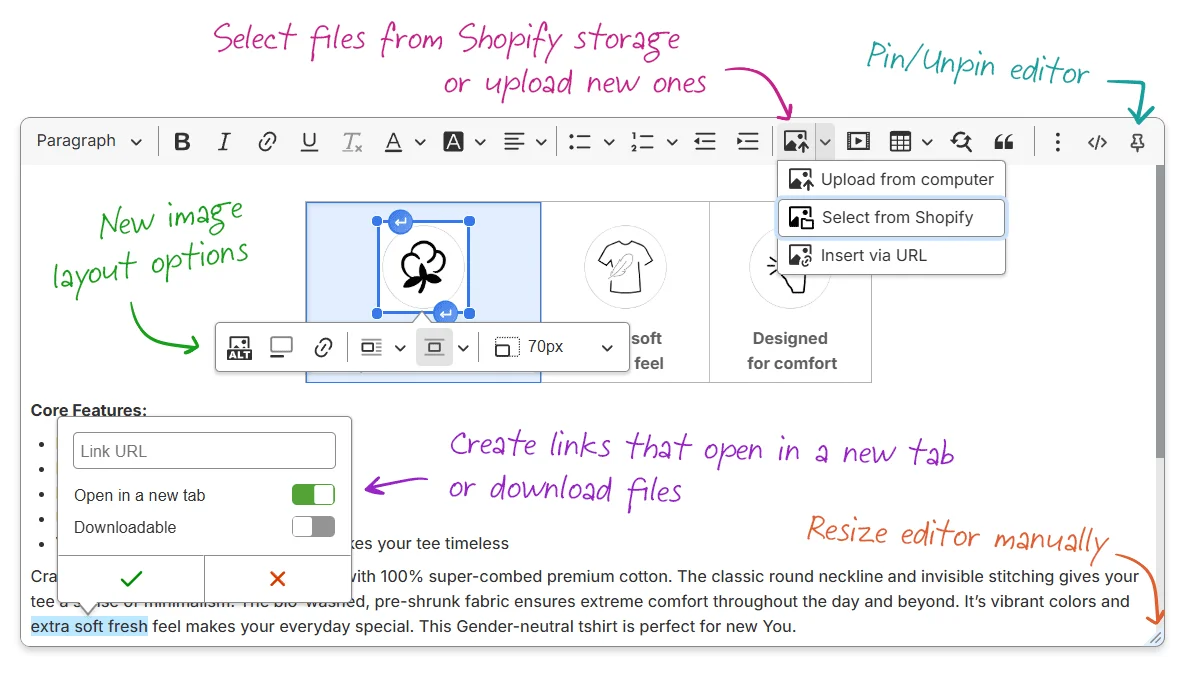
The WYSIWYG HTML editor is more powerful than ever
Our HTML editor just got a massive upgrade — a seamless integration into Shopify's file system:
- Image uploads reworked: Images are now automatically uploaded to Shopify Files instead of being stored directly in the metafield content. This improves performance and helps fit large texts with images into Shopify's limits.
- Choose from existing Shopify Files: A new image picker lets you reuse previously uploaded files with a couple of clicks.
- Responsive images out of the box: Every image added to your content includes optimized
srcsetattributes for better performance on different devices. - New image layout options: Easily adjust image size and alignment within the editor.
- Custom attributes support: You can now safely include custom styles,
classnames, and other custom attributes — they will no longer be stripped out when editing.
Other enhancements in the HTML Editor
- Improved link management: Create links that open in a new tab, or mark them as
downloadable using the
downloadattribute. - Better video embedding: Expanded support for external video platforms, including full compatibility with YouTube Shorts.
Editor pinning
There's no such thing as too much focus when writing an important text for your customers. The HTML, JSON, and Rich Text editors now include a Pin feature. Pinned editors stay maximized and locked to the screen height, giving you more space to work and making it easier to find the input when working with multiple browser tabs.
New filters for customers & pages
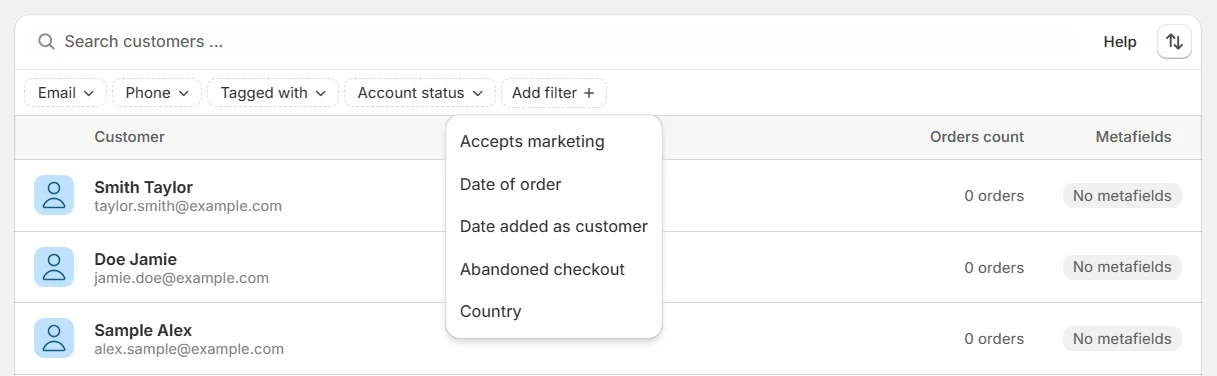
Metafield-based filtering continues to evolve! With the latest Shopify API improvements, you can now take advantage of new filters for customers and pages, enabling more precise workflows across your store.
FAQ
What changed in the Metafields Guru HTML editor in the April 2025 update?
The HTML editor was integrated with Shopify Files: pasted or uploaded images now go to Shopify
Files instead of being embedded in the metafield value, a new picker lets you reuse files you
already uploaded, images get responsive srcset attributes automatically, you get new
size/alignment layout options, and custom attributes (styles, class names) on your markup are
preserved instead of being stripped. Link management and video embedding (including YouTube
Shorts) were also improved, and the HTML, JSON, and Rich Text editors gained a Pin feature.
Where do images go when I paste them into the HTML editor now?
Images are automatically uploaded to Shopify Files rather than stored directly inside the metafield's HTML content. This keeps large texts with images within Shopify's content size limits and improves performance.
Can I reuse an image I already uploaded to Shopify Files?
Yes. The HTML editor's image picker lets you choose from files already uploaded to your store's Shopify Files in a couple of clicks, instead of uploading the same image again.
What does the editor Pin feature do?
Pinning keeps the HTML, JSON, or Rich Text editor maximized and locked to the screen height while you work, so the input stays easy to find and edit even when you have multiple browser tabs open.
Which resources can I filter by metafields in Metafields Guru?
As of the April 2025 update, metafield-based filtering covers customers and pages in addition to products and collections, taking advantage of Shopify's API improvements to enable more precise workflows across the store.
Try it
Open Metafields Guru from your Shopify admin and try the HTML editor's Shopify Files picker or the new customer/page filters. New to Metafields Guru? Install it from the Shopify App Store or start with the introduction.