Metafields Guru browser extension 4.1.1: built for Shopify's new admin and Sidekick

The Metafields Guru browser extension has been updated to version 4.1.1 for Chrome and Firefox. It now fits Shopify's new admin layout, and it plays nicely with Sidekick and other side panels that open on the right - the extension moves aside instead of hiding behind them. Keep editing metafields right on the product, order, or customer page, with Sidekick open next to it.
What's new at a glance
- Fits Shopify's new admin - the extension panel now uses the full height of the page and matches the new admin frame instead of leaving a gap for the old top bar.
- Works side by side with Sidekick - when Sidekick or another right-side panel opens, the extension moves aside instead of being covered by it.
- Dropdowns stay in view - pickers and menus opened from the extension no longer slide under a side panel.
A panel that fits the new admin
Shopify's new admin wraps page content in a rounded frame with a thin margin around it. The browser extension now follows that layout: its floating panel runs almost the full height of the window, with rounded corners and a soft edge that line it up with Shopify's own frame, rather than starting below a top bar that is no longer there.
The collapsed Metafields Guru tab on the right edge of the page got a refresh too - a cleaner rounded button that sits flush against the edge and nudges out slightly on hover.
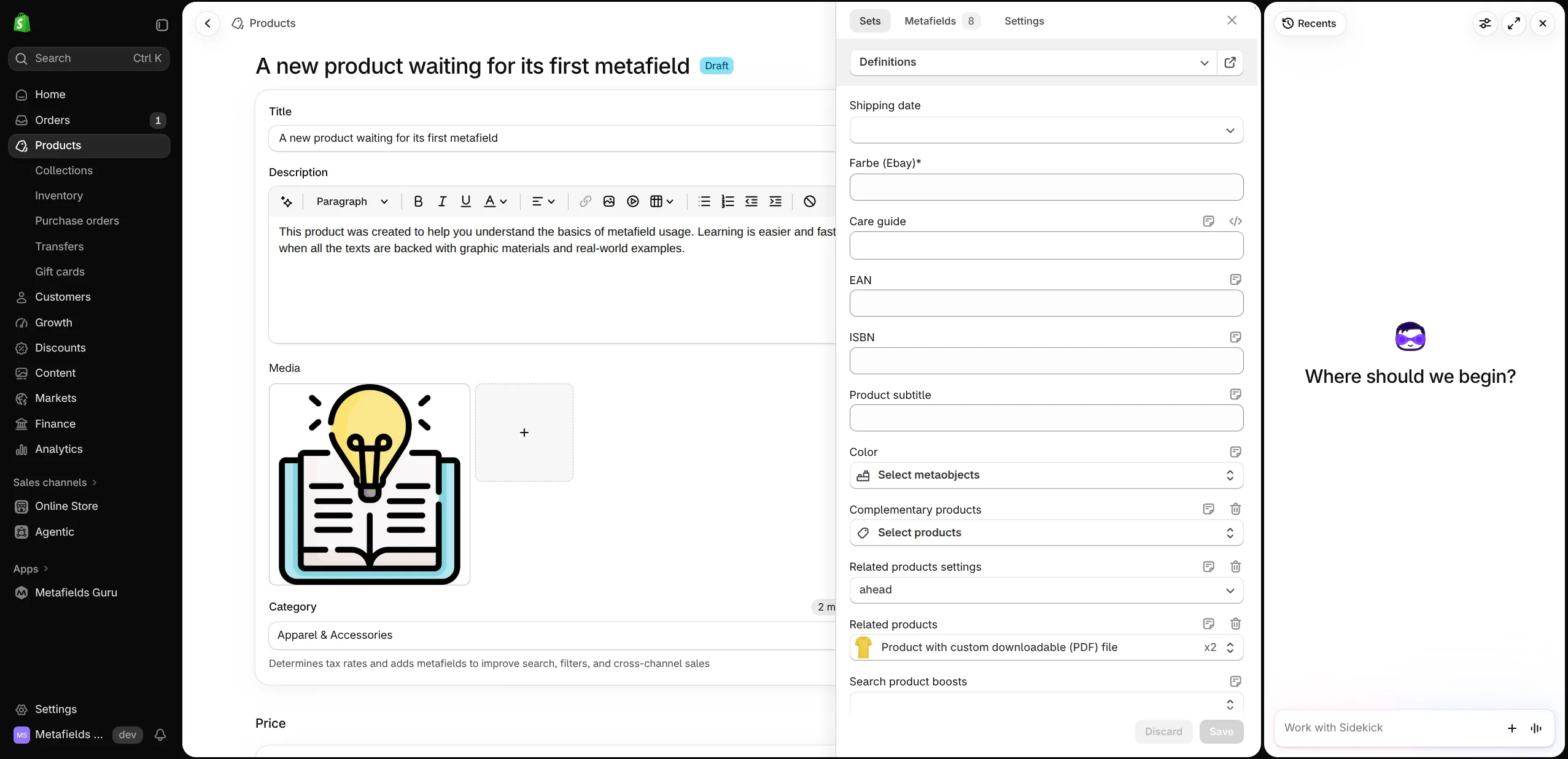
Room for Sidekick and other side panels
The new admin can open Sidekick and other panels on the right side of the screen, which shrinks the main content area. Previously the extension was pinned to the very edge of the browser window, so a side panel could cover it.
In version 4.1.1 the extension keeps track of where Shopify's main content area ends:
- the open panel and the collapsed tab always sit at the edge of the main content, next to the side panel, not underneath it;
- when the side panel is opened, resized, or closed, the extension follows it automatically - no page reload needed;
- dropdowns, color pickers, and other pop-ups opened from inside the extension are positioned so they don't end up hidden behind the side panel.
This works the same in Chrome and Firefox, on every resource page the extension supports.
FAQ
Can I use the Metafields Guru browser extension while Sidekick is open?
Yes. Starting with version 4.1.1, the extension panel and its collapsed tab follow the edge of Shopify's main content area. When Sidekick or another side panel opens on the right, the extension shifts left to sit next to it, and moves back when the panel closes. Dropdowns and pickers opened from the extension are also kept clear of the side panel.
How do I update the browser extension to version 4.1.1?
Chrome, Firefox, and other Chromium-based browsers update extensions automatically, so in most
cases you do not need to do anything. To check your version, open the extensions page of your
browser (for example chrome://extensions or about:addons) and look at Metafields Guru. If
you have not installed the extension yet, get it from the Chrome Web Store or Firefox Add-ons.
Which browsers does the Metafields Guru extension support?
Version 4.1.1 is available for Google Chrome and Mozilla Firefox. The Chrome Web Store version also works in other Chromium-based browsers such as Edge, Opera, Brave, and Vivaldi.
Try it
Open any product, collection, customer, or order in your Shopify admin and click the Metafields Guru tab on the right edge of the page - then open Sidekick and watch the extension make room for it. Don't have the extension yet? Install it for Chrome or Firefox, or follow the installation guide.