Metafields Guru January 2025 update: metafield-based product search filters and smarter date range filters

In January 2025, Metafields Guru added metafield-based filtering and search for products, so you can narrow down your catalog by metafield value and combine that with bulk editing, exporting, or the Excel-like editor. The same update introduced a more precise date range filter across every resource in the app.
What's new at a glance
- Filter and search products by metafield value, then bulk-edit, export, or work with the results in the Excel-like editor.
- Seven supported metafield types for filtering: single line text, product reference, boolean, collection reference, page reference, metaobject reference, and ID (plus their list variants).
- Requires a matching metafield definition with the Filtering for products option enabled.
- Shopify caps indexable metafields at 50 filtering-enabled definitions per store.
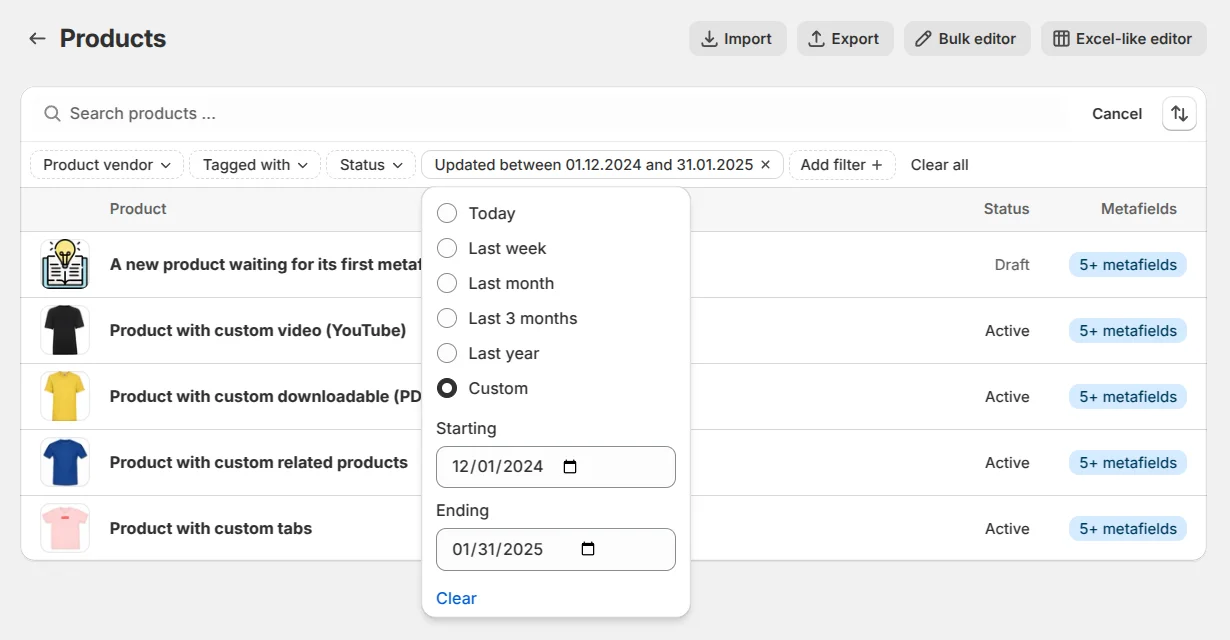
- New "from-to" date range filter for more precise filtering across all entities.
Metafield-based filtering and search
You can now filter and search your products based on metafield values! Unlock this feature's full potential with bulk actions like editing, exporting, and working in our Excel-like editor.
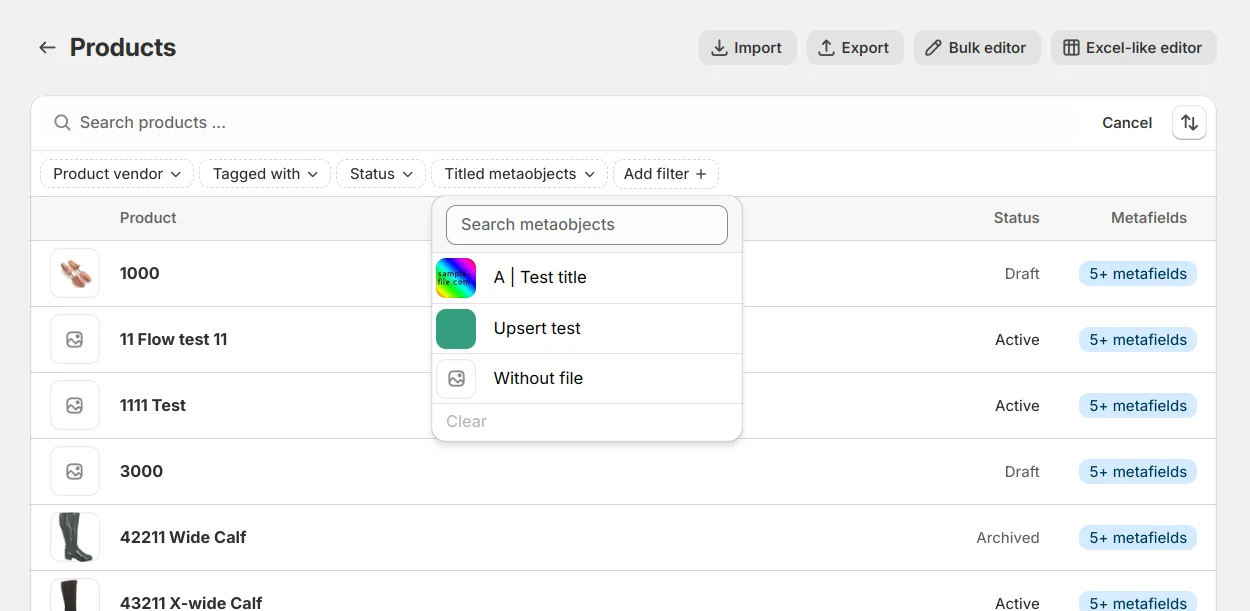
The metafield-based filtering and search come with multiple Shopify-inflicted limitations:
- Supported metafield types:
- Single line text / Single line text (list)
- Product reference / Product reference (list)
- True or false (boolean)
- Collection reference / Collection reference (list)
- Page reference / Page reference (list)
- Metaobject reference / Metaobject reference (list)
- ID
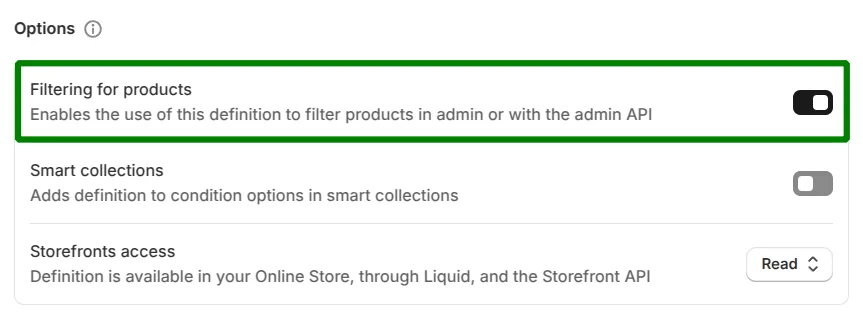
- Matching metafield definitions are required:
-
Create a metafield definition for your products with a supported type.
-
Enable the Filtering for products option:
-
- Total number of indexable metafields: Currently, Shopify allows only 50 metafield definitions with filtering enabled per store. Get creative and choose your metafield definitions wisely to maximize the utility of this feature.
Once set up, a metafield appears as a filtering option in our app's search functionality, streamlining your workflow across all tools in Metafields Guru. Check out this step-by-step tutorial to create your first indexable metafield.
Enhanced date filters
We've also improved the filtering experience across all entities by introducing a more intuitive date range filter. You can now effortlessly filter items by selecting a "from-to" date range, giving you greater precision and control when working with your data.
FAQ
Can I filter and search products by metafield value in Metafields Guru?
Yes. You can filter and search your products based on metafield values, and unlock this feature's full potential with bulk actions like editing, exporting, and working in the Excel-like editor.
Which metafield types support filtering and search?
Supported types are: single line text / single line text (list), product reference / product reference (list), true or false (boolean), collection reference / collection reference (list), page reference / page reference (list), metaobject reference / metaobject reference (list), and ID.
What do I need to set up before a metafield shows up as a filter?
You need a matching metafield definition for your products with a supported type, and the "Filtering for products" option enabled on that definition. Once set up, the metafield appears as a filtering option in the app's search functionality across all tools in Metafields Guru.
How many metafields can I make filterable on one store?
Currently, Shopify allows only 50 metafield definitions with filtering enabled per store, so choose your metafield definitions wisely to maximize the utility of this feature.
What changed with the date filters in this update?
The filtering experience across all entities was improved with a more intuitive date range filter - you can now effortlessly filter items by selecting a "from-to" date range for greater precision and control when working with your data.
Try it
Open Metafields Guru from your Shopify admin, enable Filtering for products on a metafield definition, and try the new product search filters. See the filterable metafield tutorial for a step-by-step walkthrough. New to Metafields Guru? Install it from the Shopify App Store or start with the introduction.