Metafields Guru March 2022 update: the Excel-like editor and Sandbox mode

In March 2022, Metafields Guru introduced the Excel-like editor, a spreadsheet-style way to edit metafields for multiple products on a single page, and Sandbox mode, which unlocks advanced features for free on development, trial, and partner test stores. Here's what each one does and why they matter if you manage metafields at scale.
What's new at a glance
- Excel-like editor - a new spreadsheet-style visual editor for bulk-editing metafields across multiple products on one page.
- Configurable columns - pick which metafields show up as editable columns: metafield sets, Shopify metafield definitions, or custom metafields.
- Sandbox mode - unlimited free access to advanced features (Excel-like editor, browser extension, metafield sets) on development, trial, and partner test stores.
- Sandbox mode ends on upgrade - switching to a paid Shopify plan disables Sandbox mode until you upgrade your Metafields Guru subscription.
Meet the all-new Excel-like editor
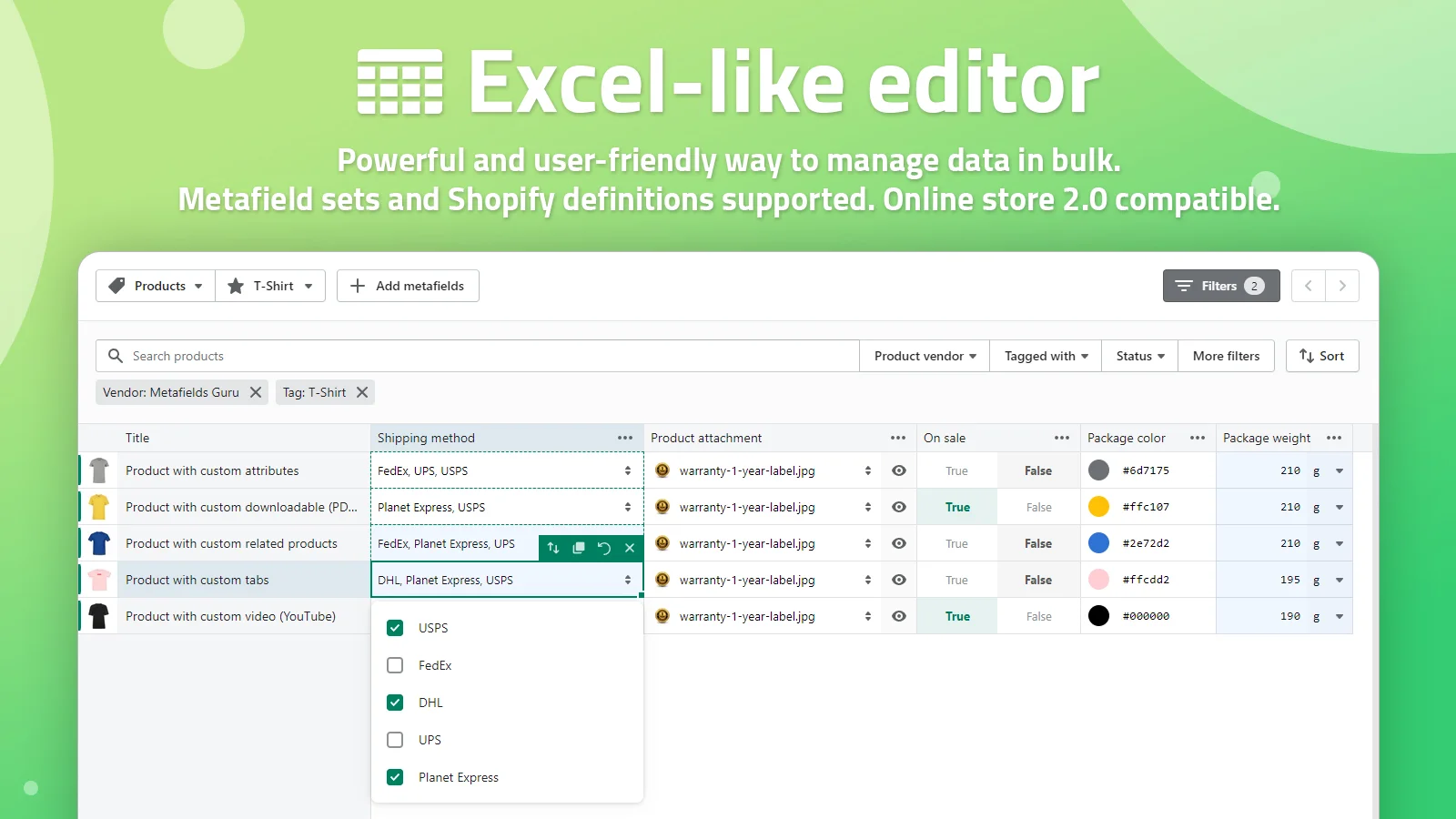
It's time to introduce the new feature designed to turn your hard work into a "not-so-hard" work. Meet the all-new Excel-like editor!
We believe that this feature will come handy for those of you who prefer to manage the data with the spreadsheets. No need to hassle with multiple spreadsheets and data exports/imports, simply edit all the data in one place. Sounds great, right?
Even if you are completely new to spreadsheets, there is literally nothing to worry about as this feature is intuitive and user friendly, which makes it really easy to use. Basically, it's a visual editor that helps you to edit metafields for multiple products on the same page. You can configure the list of metafields to be displayed/edited: select from either metafield sets, Shopify metafield definitions or simply add a bunch of custom metafields — it's up to you to decide.
Sandbox mode
We constantly improve our app by introducing new features. It takes lots of time and effort to develop and maintain the infrastructure behind these features, so they are available only in our advanced plans. However, due to the restrictions of Shopify payment system, only paid Shopify stores can upgrade third-party apps subscriptions. To overcome this limitation and make the advanced features available for development, trial and partner test stores we're introducing the Sandbox mode.
The Sandbox mode grants you unlimited access to multiple advanced features as long as you don't switch to a paid Shopify plan:
Once you switch to a paid Shopify, the Sandbox mode will be disabled and you'll need to upgrade your Metafields Guru subscription to keep using these features.
FAQ
What is the Excel-like editor in Metafields Guru?
The Excel-like editor is a spreadsheet-style visual editor that lets you edit metafields for multiple products on the same page, without juggling separate spreadsheet exports and imports. You choose which metafields appear as columns - from metafield sets, Shopify metafield definitions, or custom metafields you add yourself.
What is Sandbox mode?
Sandbox mode gives development, trial, and partner test stores unlimited access to advanced features - the Excel-like editor, the browser extension, and metafield sets - without needing a paid Metafields Guru plan, since Shopify's payment system only allows paid stores to upgrade third-party app subscriptions.
Which plans include the Excel-like editor?
The Excel-like editor is part of Metafields Guru's advanced plans; development, trial, and partner test stores can use it for free instead via Sandbox mode.
What happens to Sandbox mode when I upgrade my Shopify plan?
Once you switch to a paid Shopify plan, Sandbox mode is disabled, and you need to upgrade your Metafields Guru subscription to keep using the advanced features it unlocked.
Try it
Open Metafields Guru from your Shopify admin and try the Excel-like editor for yourself. New to Metafields Guru? Install it from the Shopify App Store or start with the introduction.