Product taxonomy value fields in metaobjects: readable pickers instead of raw IDs

Editing a metaobject entry that uses one of Shopify's standardized product attributes - fields like Base color, Age group, or Fit - used to mean staring at a meaningless code instead of an actual value. Not anymore: those fields now show the real, readable name, and a color swatch whenever the attribute is a color, so you can pick "Beige" by seeing it, not by guessing from an ID.
What's new at a glance
- Readable names, not raw IDs - metaobject fields built on Shopify's standardized product attributes (Base color, Age group, Fit, and similar) now show the actual name instead of a meaningless code.
- Color swatches, not guesswork - color-based attributes show a small swatch next to every choice, so you can see the shade instead of reading a name and hoping.
Why raw taxonomy IDs were a problem
Shopify's standardized product attributes - the ones behind fields like Base color, Age group,
or Target gender - store their values as internal ID codes, not plain text. Before this update,
editing one of these fields in a metaobject entry meant looking at a string like
gid://shopify/TaxonomyValue/..., with no way to tell it meant "Beige" and not "Khaki" without
leaving the app.
Readable names and color pickers
Opening one of these fields on a metaobject entry now opens a proper picker instead of a raw ID. The activator itself shows the currently selected value's name and, for color attributes, its swatch - so you can see what's selected without opening anything.
Color attributes get a small swatch next to every option, not just the selected one, so you can visually confirm a shade before picking it instead of guessing from the name alone.
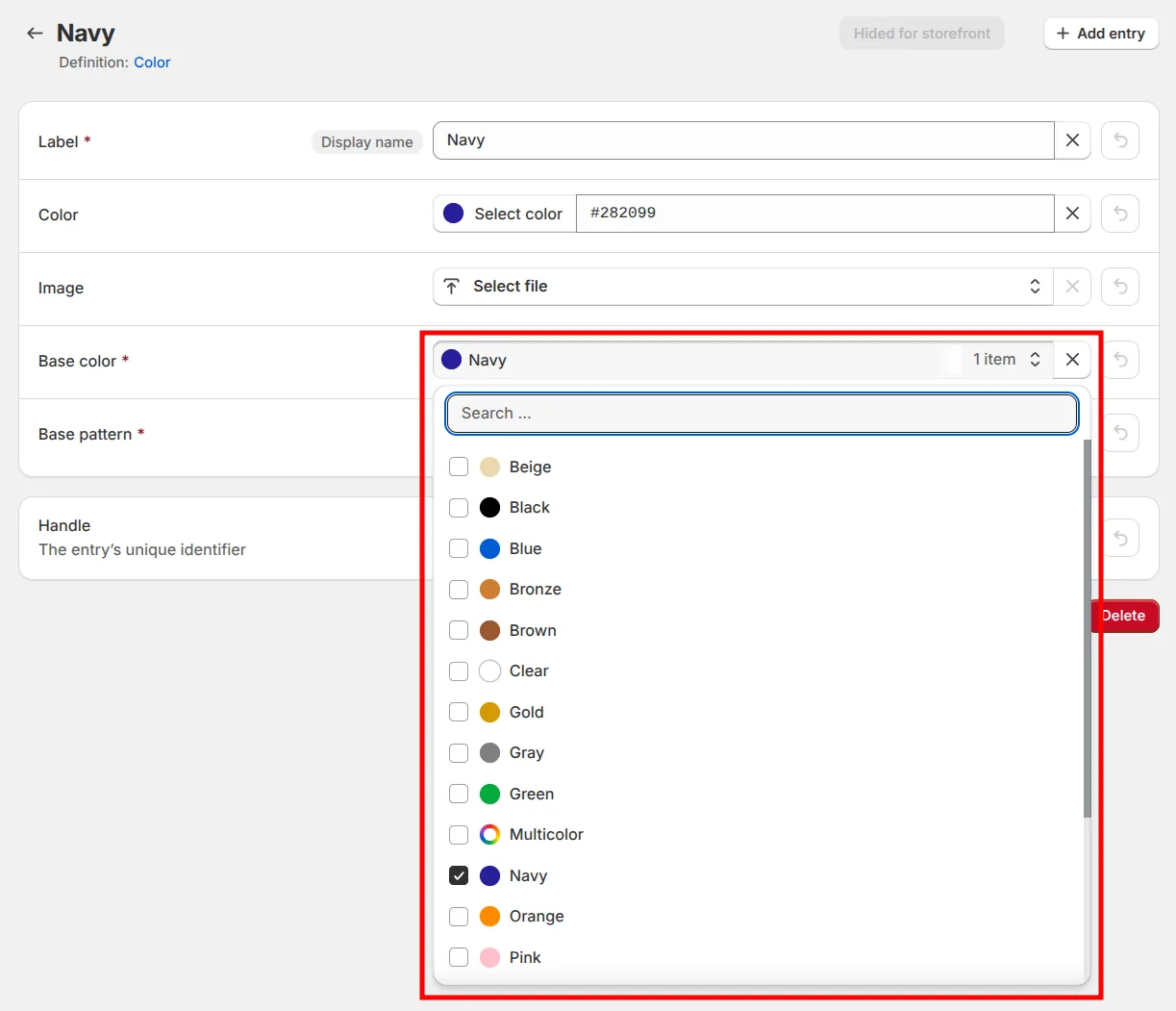
It works the same way when a field accepts more than one value - you can add and remove entries just like any other list field in the app.
Also worth knowing: multiline text fields already get a full visual editor
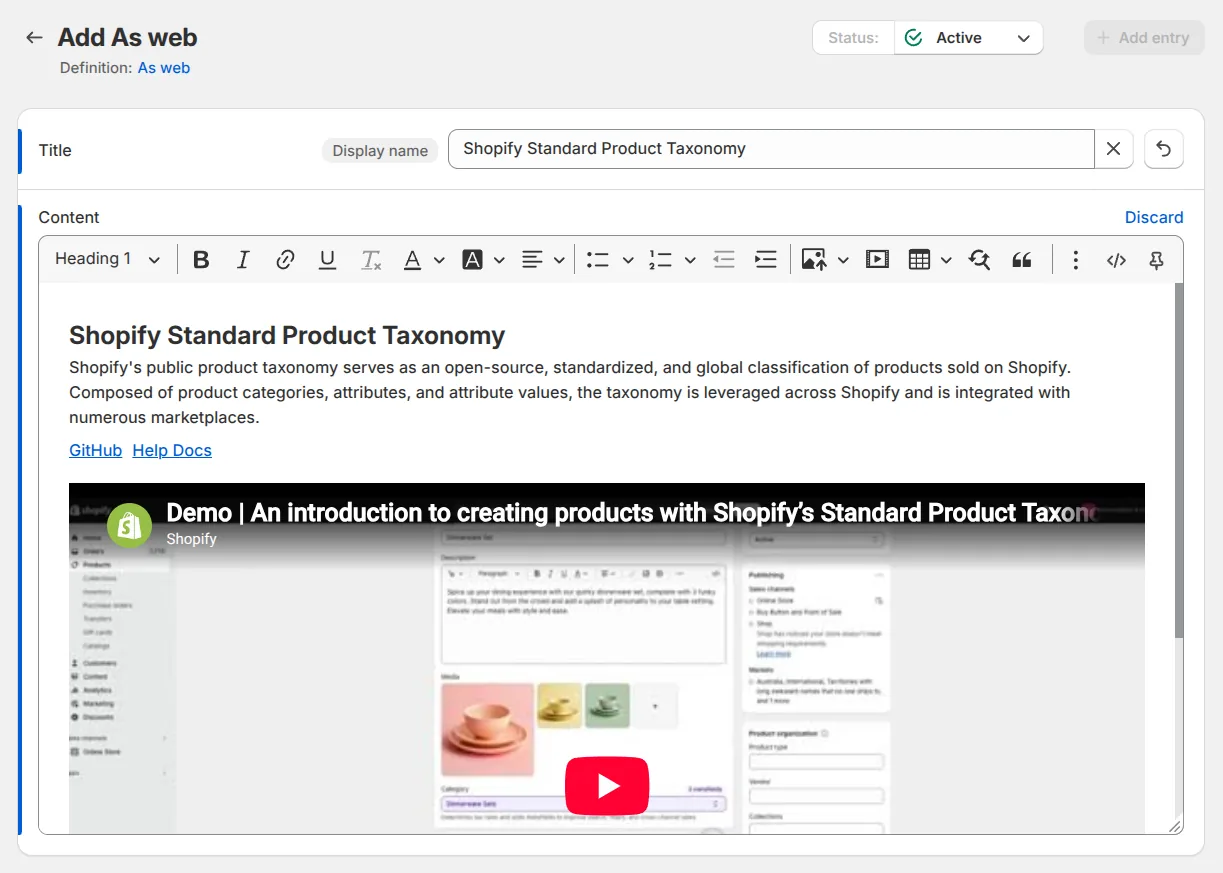
Not part of this update, but worth mentioning since it applies to metaobjects too: Shopify's own metaobject editor treats multiline text fields as a plain textarea, with no formatting at all. Metafields Guru's editor goes well beyond bold and lists - it handles images, tables, and even embedded YouTube videos, right inside the field, no HTML required.
FAQ
What is a product_taxonomy_value_reference metafield field?
A product_taxonomy_value_reference field stores a reference to one entry in Shopify's built-in
product taxonomy - the same taxonomy behind standardized attributes like Color, Age group, or
Target gender. Metaobject definitions that represent a standardized attribute use this type for
the field that holds the actual value. list.product_taxonomy_value_reference is the same thing
for fields that accept more than one value.
Why did my metaobject fields show random IDs before?
Metafields Guru didn't previously resolve these fields to their taxonomy values, so it displayed the raw stored ID instead of a name. That's fixed now: the field resolves to its real name, and color where one exists, automatically.
Does the picker show every possible taxonomy value?
No. It only lists values that are actually valid for that field's attribute - a "Base color" field only shows color values, an "Age group" field only shows age-group values, and so on.
Does this work for fields that hold more than one value?
Yes. Fields defined with list.product_taxonomy_value_reference let you add and remove multiple
taxonomy values on the same metaobject entry, the same way any other list field works in the
app.
Is the visual editor for multiline text fields new?
No - it's the same visual editor Metafields Guru already uses for multiline text fields everywhere, including on metaobject entries. It supports formatting, images, tables, and embedded video, not just bold text, unlike Shopify's own metaobject editor, which only offers a plain textarea.
Try it
Open Metafields Guru from your Shopify admin and edit a metaobject entry that uses a standardized attribute like Color or Age group - the taxonomy value picker, with its color swatches, will be there automatically. New to Metafields Guru? Install it from the Shopify App Store or start with the introduction.