Enable Shopify's standard metafield definitions in one click from Metafields Guru

Metafields Guru now supports Shopify's standard metafield definitions. Open Metafield sets, switch to the Definitions tab, click Add standard field, and turn on the built-in fields Shopify already knows about - product rating, care guide, UPC/EAN/ISBN, related products, and dozens more - without ever leaving the app.
What's new at a glance
- Add standard field button on the Definitions tab of Metafield sets - opens a categorized list of Shopify's standard metafield definitions for that resource.
- One click per field - select any number of definitions and enable them all at once; no manual namespace, key, or type entry.
- Real Shopify definitions - once enabled, a standard field is a normal metafield definition, visible in Shopify admin and usable across the whole Metafields Guru toolset.
- Already-enabled fields are hidden automatically, so the list only ever shows what you can still add.
What are Shopify's standard metafield definitions?
Shopify reserves a set of namespace/key pairs for common, well-known pieces of product and store data - things like a product's care guide, its UPC / EAN / ISBN code, its rating, or a list of related products. Shopify publishes the full, up-to-date list in its own list of standard metafield definitions.
Each standard definition ships with a fixed name, namespace and key, type, and
description already decided by Shopify - you don't design the schema, you just turn the
field on. Because the meaning of reviews.rating or custom.care_guide-equivalent standard
keys is the same on every store that enables them, apps, sales channels, and theme
integrations that read structured product data can rely on them without any store-specific
configuration.
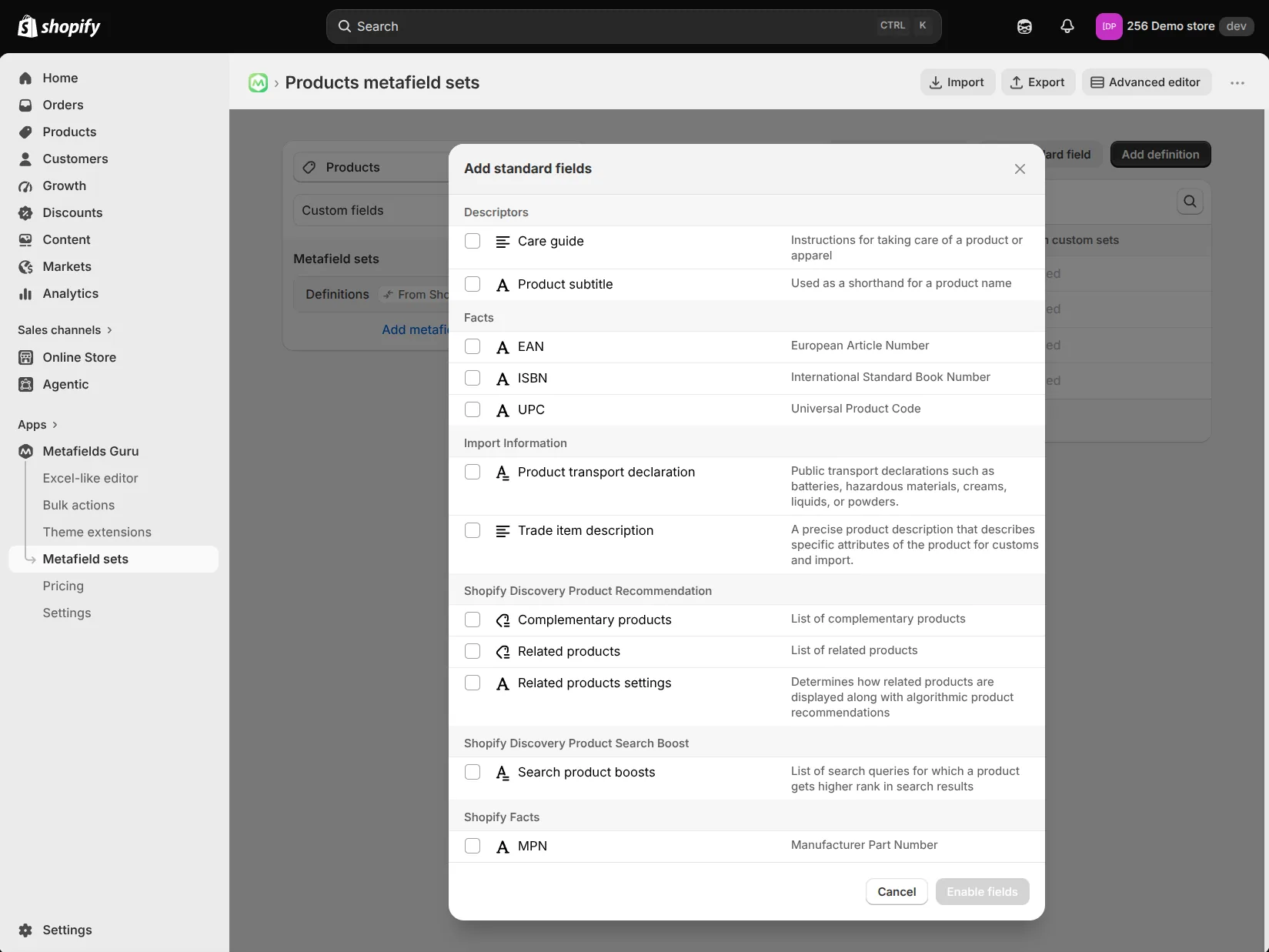
Standard fields are grouped by category - Descriptors (care guide, product subtitle), Facts (EAN, ISBN, UPC), Import Information (transport declaration, trade item description), Shopify Discovery groups for product recommendations and search boosting, and more. The exact list Shopify offers depends on the resource - products, variants, collections, and other owner types each have their own set.
Why enable standard metafields
- Interoperability - a standard field is understood the same way by any app, sales channel, or theme that was built to read it, since the namespace and key are reserved by Shopify rather than invented per-store.
- No schema design - the type, validation, and description are already set correctly, so there is nothing to get wrong when setting one up.
- Structured, machine-readable data - product ratings, GTINs (UPC/EAN/ISBN), and similar standard fields give search engines, shopping feeds, and AI shopping agents a consistent way to read facts about your products, instead of guessing from unstructured description text.
- Works everywhere your other metafields work - once enabled, a standard field behaves exactly like any other definition inside Metafields Guru.
How to enable standard metafields in Metafields Guru
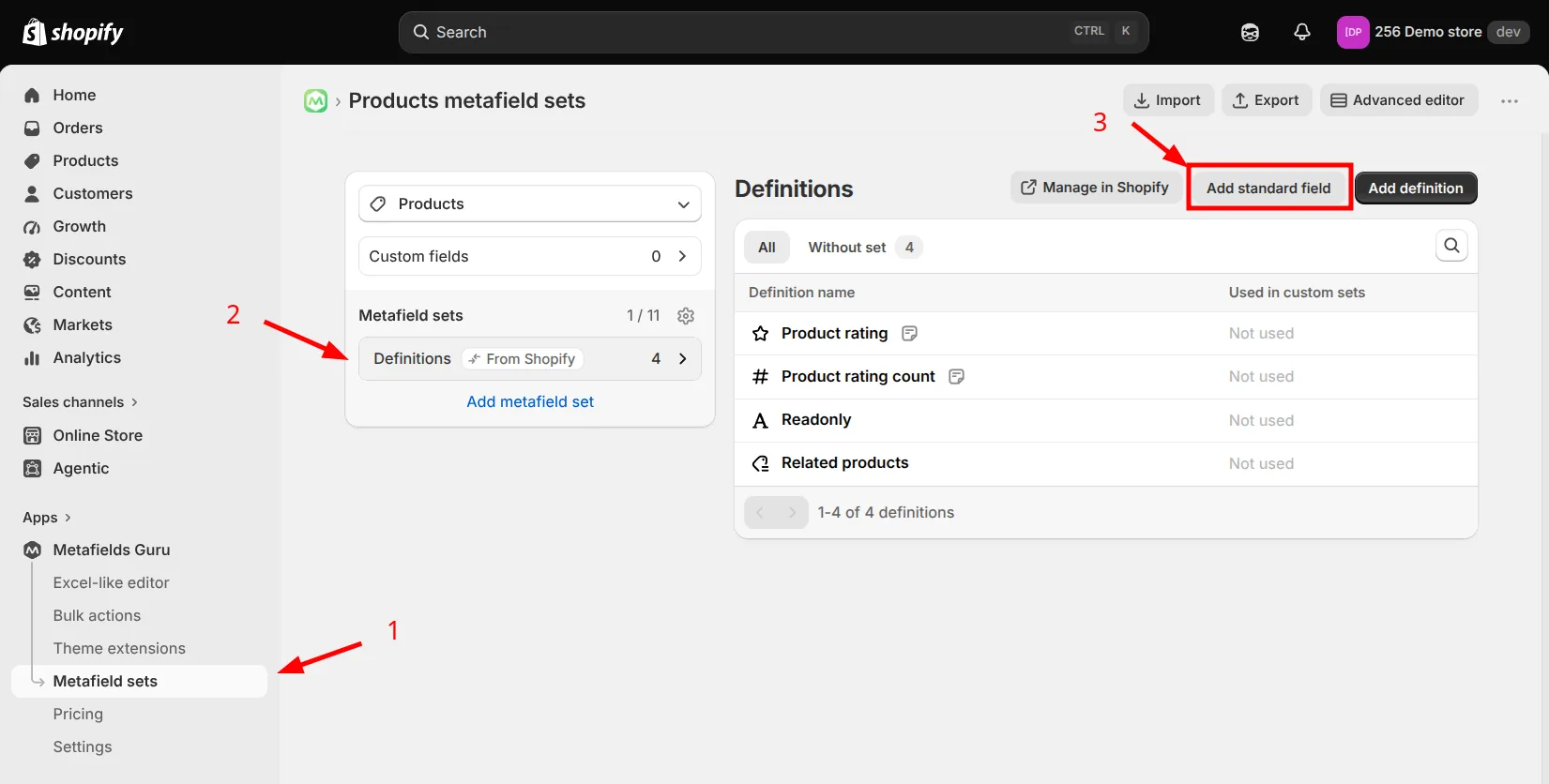
- Open Metafields Guru from your Shopify admin and go to Metafield sets.
- Pick the resource you want (for example Products), then open the Definitions tab.
- Click Add standard field.
- In the Add standard fields modal, browse the definitions available for that resource - they're grouped by category (Descriptors, Facts, Import Information, and so on).
- Check every field you want to enable.
- Click Enable fields.
That's it - the fields you selected are created as standard metafield definitions on your store and immediately available in the metafields editor, the Excel-like editor, the bulk editor, CSV import/export, metafield sets, and the browser extension, exactly like any other definition.
Try it
Open Metafields Guru from your Shopify admin, go to Metafield sets → Definitions, and click Add standard field to see which of Shopify's built-in fields you can turn on today. New to Metafields Guru? Install it from the Shopify App Store or start with the introduction.